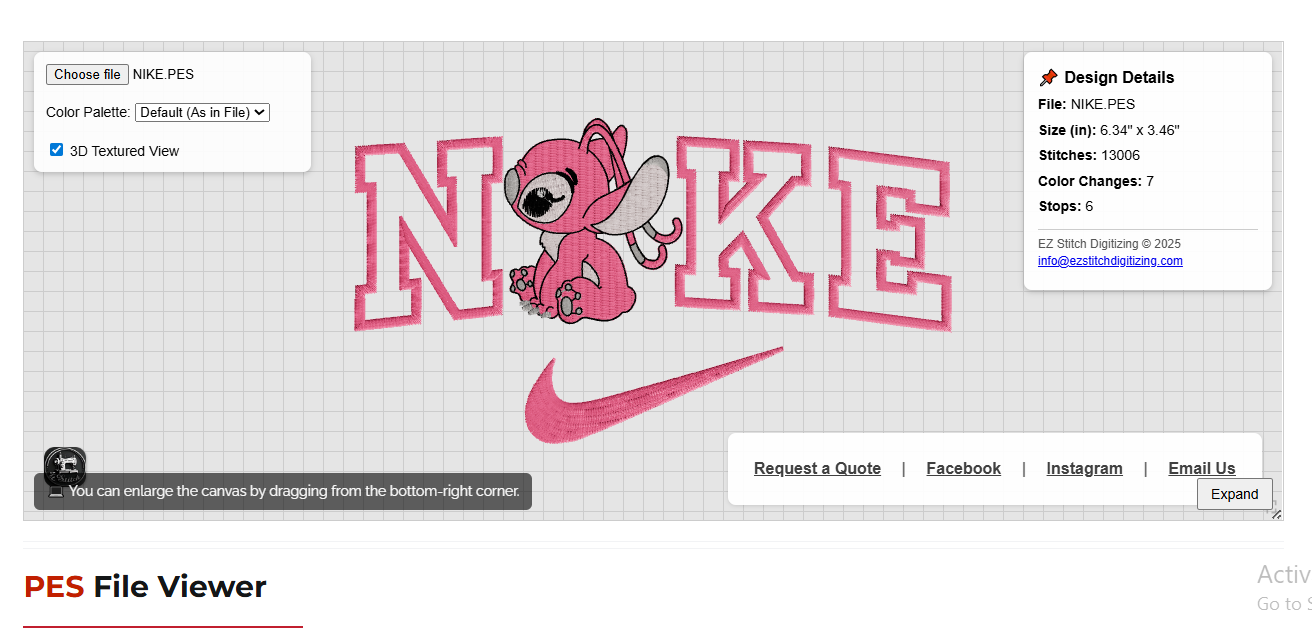
👉 Use our Free Online PES File Reader & 3D Viewer here:
Free Online PES Viewer & Analyzer
(Instant preview, no software, works on all devices)
When working with machine embroidery—especially with Brother embroidery machines—PES files are essential. A PES reader allows you to open, view, and analyze embroidery designs before stitching them. Without the right reader, inspecting stitch paths, color changes, or size can be difficult and risky for production.
This guide explains:
What a PES file reader is
How to open PES files online
Best software options
Why our browser-based PES file reader is the easiest solution
FAQs about PES embroidery files
What Is a PES File Reader?
A PES reader is a tool or software that opens and displays embroidery designs saved in the .PES format, which is the native embroidery format used by Brother, Babylock, and Bernina machines.
PES files store:
Stitch paths
Thread colors
Design size
Color stops
Machine commands
A good PES reader lets you:
View embroidery designs before stitching
Check stitch count and dimensions
Verify color order
Detect jump stitches
Convert or edit files (in some tools)
Without a proper reader, users often rely on guesswork, leading to thread waste or misaligned designs.
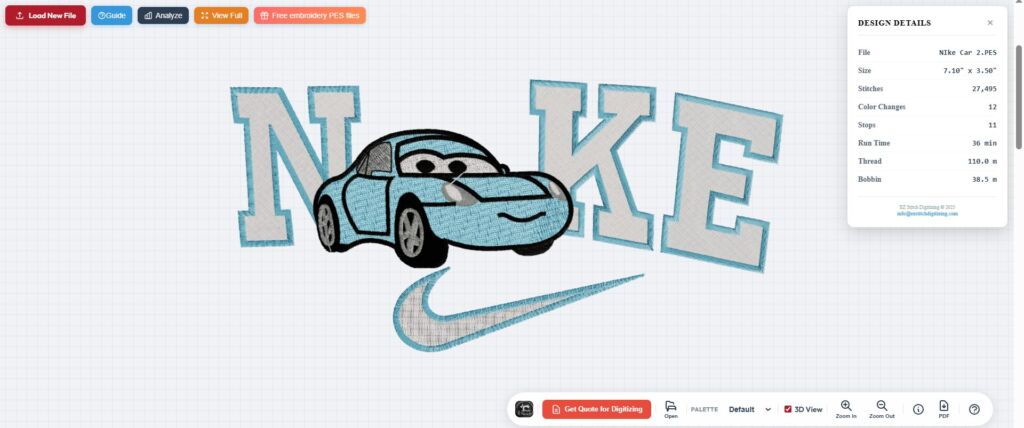
Best Way to Read PES Files (No Software Required)
⭐ Free Online PES File Reader (Recommended)
Our Free Online PES Viewer & Analyzer is a professional-grade PES file reader that runs directly in your web browser.
Why it stands out:
No installation
Works on Windows, Mac, Chromebook, iPhone, and Android
Realistic 3D embroidery preview
Instant stitch analysis
100% private (client-side processing)
What it does:
Opens PES embroidery files instantly
Shows stitch paths in 2D and 3D
Displays stitch count, size, and color changes
Detects jump stitches
Supports Brother, Babylock, and Bernina PES formats
👉 Try it here: Free Online PES Viewer & Analyzer
This makes it the easiest PES file reader online for both beginners and professionals.
Popular PES Reader Software (Desktop Options)
1. Brother PE-Design
Brother’s official embroidery software.
✔ View and digitize PES files
✔ Professional tools
❌ Expensive
❌ Requires installation
2. Embrilliance Essentials
✔ Easy interface
✔ Resize and combine designs
✔ Works on Windows and Mac
❌ Limited editing without add-ons
3. Wilcom TrueSizer
✔ Industry standard
✔ Opens and converts PES files
✔ Free version available
❌ Desktop-only
❌ Heavy system usage
4. My Editor
✔ Free
✔ Lightweight PES reader
✔ Good for quick checks
❌ Limited tools
Online PES Reader vs Desktop Software
| Feature | Online PES File Reader | Desktop Software |
|---|---|---|
| Installation | ❌ None | ✔ Required |
| Works on mobile | ✔ Yes | ❌ No |
| 3D preview | ✔ Yes | Limited |
| Privacy | ✔ Client-side | Often cloud-based |
| Cost | ✔ Free | Often paid |
| Speed | ✔ Instant | Slower startup |
How to Use a PES Reader (Step-by-Step)
Upload your PES file
Select or drag your .PES file into the PES file reader.Preview the design
Instantly view stitch paths and colors.Inspect design details
Check stitch count, size (mm/inches), and thread changes.Switch to 3D mode
Rotate and zoom for realistic embroidery simulation.Verify before stitching
Ensure it fits your hoop and thread order is correct.
Who Uses PES Readers?
🧵 Hobby Embroiderers
Preview designs before stitching and avoid mistakes.
🧵 Professional Digitizers
Verify stitch density, jump stitches, and direction.
🧵 Embroidery Businesses
Let customers preview designs before production.
🧵 Mobile Users
Open PES files on phones and tablets without software.
Why Use Our embroidery File Reader for PES?
✔ Free
✔ No installation
✔ Works on any device
✔ Realistic 3D embroidery preview
✔ Stitch count & size analysis
✔ Color palette switching
✔ Privacy-first
It’s an ideal PES embroidery file reader for checking quality before stitching or selling designs.
Need More Than a PES File Reader?
We also provide professional embroidery services:
✅ Custom embroidery digitizing
✅ PES file fixing and editing
✅ Vector conversion and cleanup
✅ Fast delivery & affordable pricing
📧 Email: info@ezstitchdigitizing.com
📘 Facebook: EZ Stitch Digitizing
👉 Request a Free Quote Today
⚠ Disclaimer
This PES file reader displays design information based on data inside the PES file. Stitch count, size, and color stops are estimates and may vary slightly depending on machine settings, thread tension, and fabric type. Always test stitch designs before full production.