Last updated: November 7, 2026. This page contains affiliate links. As an Amazon Associate We earn from qualifying purchases, at no extra cost to you. Specs are taken from Brother's published product pages and can change.
Brother SE725 Review: Specs, Features & SE700 Comparison
The Brother SE725 is a computerized sewing and embroidery combo machine aimed at home sewers, hobbyists and people testing a small embroidery side business. It pairs 103 built-in sewing stitches with 135 built-in embroidery designs, 10 lettering fonts, a 4″ × 4″ embroidery area and wireless LAN design transfer.
This review covers what those specs mean in practice, how the SE725 compares with the SE700 (on paper they are nearly identical, and the SE700 is the one you can buy on Amazon), who should look at a different machine, and what extras you will need to buy. If you are comparing several Brother models, see our guide to the best embroidery machines for small business.
Why the Brother SE725 Stands Out
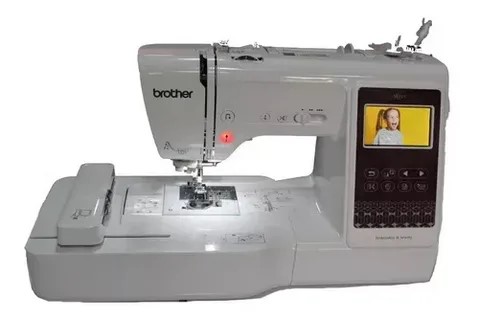
Key features explained
- Sewing: 103 built-in stitches cover utility and decorative sewing, with 10 one-step auto-size buttonhole styles and a top speed of 710 stitches per minute.
- Embroidery: 135 built-in designs and 10 lettering fonts for monograms, previewed on a 3.2″ LCD touchscreen.
- Wireless transfer: Send design files from your computer to the machine over wireless LAN, with no USB cable needed for designs.
- Included feet: Eight presser feet: zigzag, monogramming, overcasting, zipper, blind stitch, button fitting, buttonhole and embroidery.
small logos, monograms, patches
larger, multi-element designs
Drawn to scale: 40 px = 1 inch.
Embroidery area: what a 4″ × 4″ hoop really fits
The SE725 ships with a medium 4″ × 4″ (100 × 100 mm) embroidery frame, inside a 6.4″ × 4.0″ work area. That is enough for monograms, patches, appliqué, labels and small logos. It is not enough for large chest, back or jacket designs. The diagram below shows the 4″ × 4″ area next to a 5″ × 7″ area (the size of the Brother PE800, an embroidery-only machine) at the same scale.
Built-in designs, fonts and wireless transfer
The 135 built-in designs and 10 fonts are handy for monograms and quick gifts. For anything custom, such as a business logo, you need a stitch file. Brother home machines read the PES format, and a PNG or JPG on its own cannot be stitched. You can check a file with our free online PES viewer, read how to convert PNG to PES, or see our free digitizing software for Brother machines.
Once you have a PES file, wireless LAN lets you send it from your computer to the machine without a USB cable. Per Brother’s product page, the SE725 has no memory card reader, and a USB drive (not included) is only needed for firmware updates.
If you need a logo digitized properly for a machine like this, our digitizing service delivers ready-to-stitch files.
Brother SE725 vs SE700
This is the comparison most buyers search for (“brother se700 vs se725”), and the honest answer is that Brother’s own spec pages list the same core specifications for both machines. We could not find a difference in stitches, designs, fonts, embroidery area, display, wireless LAN, buttonholes or sewing speed.
The practical difference is where you can buy each one. Brother’s US site lists the SE725 as a Walmart exclusive, and we could not find it for sale on Amazon. The SE700 is available on Amazon, so if you want to buy through Amazon, the SE700 is the equivalent machine. Read our full Brother SE700 review for more on that model.
| Spec | Brother SE725 | Brother SE700 |
|---|---|---|
| Built-in sewing stitches | 103 | 103 |
| Built-in embroidery designs | 135 | 135 |
| Embroidery fonts | 10 | 10 |
| Max embroidery area | 4" × 4" | 4" × 4" |
| Work area | 6.4" × 4.0" | 6.4" × 4.0" |
| Display | 3.2" LCD touchscreen | 3.2" LCD |
| Wireless LAN | Yes | Yes |
| One-step buttonholes | 10 styles | 10 styles |
| Max sewing speed | 710 stitches/min | 710 stitches/min |
| Where it is sold | Listed by Brother as a Walmart exclusive (not on Amazon) | Available on Amazon |
Source: Brother USA product pages for the SE725 and SE700. Highlighted row = the practical difference. Specs and availability can change.
Brother SE725 vs PE800 and other Brother models
- SE725 vs PE800: The Brother PE800 is an embroidery-only machine with a larger 5″ × 7″ area. Choose it if you want bigger designs and do not need to sew. Choose the SE725 if you want one machine for both.
- Other sewing and embroidery combos: See our reviews of the Brother SE630, SE625, SE1900 and SE400.
- Embroidery-only budget option: The Brother PE535.
- Portable embroidery: The Brother Skitch PP1.
Pros and cons
What we like
- 135 built-in designs and 10 fonts out of the box
- Wireless design transfer from your computer
- One machine for sewing and embroidery
- Eight presser feet, a 4" × 4" frame and pre-wound embroidery bobbins included
- Touchscreen with design previews
What to know first
- 4" × 4" maximum embroidery area
- Single needle: you re-thread for every colour change
- No memory card reader
- USB drive (not included) needed for firmware updates
- Screen brightness is not adjustable
- Not built for high-volume production
Which machine fits you?
Pick the option that sounds most like you.
What is in the box
According to Brother, the SE725 comes with:
- Eight presser feet (zigzag, monogramming, overcasting, zipper, blind stitch, button fitting, buttonhole, embroidery)
- Medium embroidery frame set (4″ × 4″)
- Needle set and twin needle
- Bobbins, bobbin clip and pre-wound embroidery bobbins
- Seam ripper, scissors, cleaning brush, eyelet punch and two screwdrivers
- Spool accessories, foot controller, accessory bag, dust cover and manuals
What you will still need to buy
The box does not include embroidery thread spools or stabilizer. This starter checklist covers the basics. Tick items off as you go, and use the links to see current prices and details on Amazon. Check each listing’s compatibility notes before you order.
Is the Brother SE725 good for a small embroidery business?
It is a reasonable starting point for hobby sales, such as personalized gifts, monograms and small orders. Limits to plan for:
- Small hoop: The 4″ × 4″ area rules out larger chest and back designs.
- Single needle: Each colour change needs manual re-threading, which slows multi-colour orders.
- Home-machine duty cycle: It is not built for continuous production runs.
If you grow past that, a multi-needle machine is the usual next step. See our small business machine guide and the difference between embroidery and monogram machines. To price your work, read embroidery cost per 1,000 stitches. New to embroidery altogether? Start with the best home embroidery machines for beginners.
Frequently asked questions
What embroidery area does the Brother SE725 offer?
How is the Brother SE725 different from the SE700?
Can beginners use the Brother SE725?
Can I quilt with the Brother SE725?
Does the Brother SE725 come with embroidery thread?
How do I add new designs to the Brother SE725?
What file format does the Brother SE725 use for custom designs?
Is the Brother SE725 good for a small business?
Verdict: should you buy the Brother SE725?
The Brother SE725 is a solid all-in-one for hobbyists who want sewing and small-format embroidery in one machine. Its specs match the SE700, which is the version you can buy on Amazon, so choose whichever is in stock and priced best where you shop. Skip both if you need hoops larger than 4″ × 4″ or plan to run regular production orders.
Check today's price
Prices and availability change, so see the current listing.
Brother SE700 on AmazonNeed a logo digitized for your machine?
We deliver ready-to-stitch PES files for Brother home machines.
Get a digitizing quote