Your Smart Embroidery Assistant Tool
Choosing the right needle, fabric, hoop, and thread settings can make or break your embroidery project. That’s why we created the Embroidery Assistant Tool — a smart helper designed for both hobbyists and professionals.
Whether you’re working with DST, PES, EXP, or JEF files, this tool analyzes your design and provides tailored recommendations on:
Needle type & size
Thread usage
Hoop selection
Density and stitch time estimates
Placement & size guidelines
👉 Try the Embroidery Assistant Tool Here
👉 Or explore our Embroidery Thread Color Converter to convert between Madeira, Isacord, Pantone, Brother, and Wilcom charts.
Why Use an Embroidery Assistant Tool?
Even experienced embroiderers face challenges like puckered fabrics, broken needles, or wasted fabric due to incorrect hooping. The Embroidery Assistant Tool helps you avoid these issues by giving well-researched recommendations customized for your design and machine type.
✔ Perfect for beginners who want guidance
✔ Helpful for pros handling multiple file formats
✔ Saves time and reduces costly mistakes
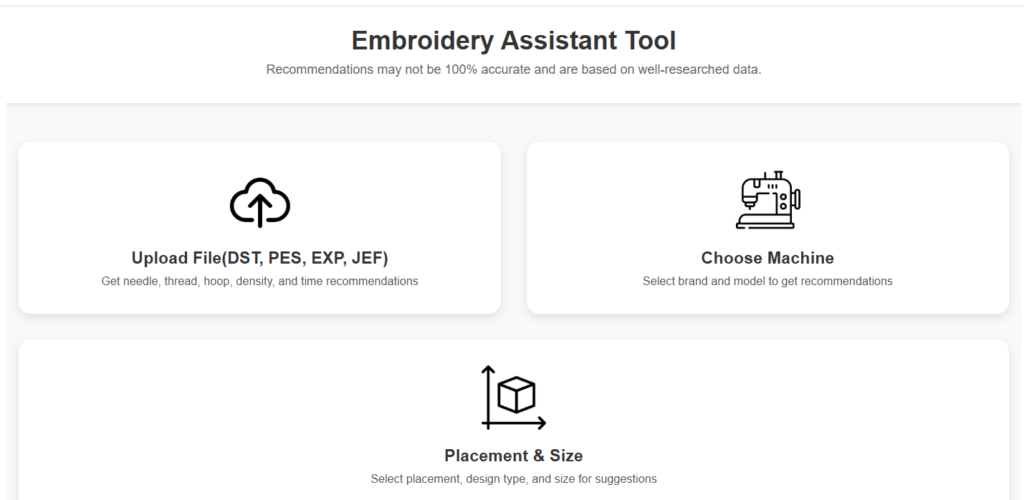
How to Use the Embroidery Assistant Tool
Upload your file – Supports DST, PES, EXP, JEF.
Choose your machine – Select your brand and model to get machine-specific advice.
Set placement & size – Pick design type (t-shirt, cap, jacket back, etc.) for tailored recommendations.
Get instant results – Needle type, fabric suggestions, hoop size, density, and stitch time estimates.
⚠️ Note: Recommendations are guidelines, not exact machine commands. Always test before production.
Key Features at a Glance
🎯 Needle & Thread Suggestions – Get the best combo for fabrics like cotton, polyester, fleece, or denim.
📏 Hoop & Size Recommendations – Avoid mis-hooping and wasted material.
⏱ Density & Time Estimates – Plan projects with run-time insights.
🪡 Machine-Specific Tips – Optimized suggestions for Brother, Janome, Tajima, Bernina, and more.
📂 File Format Support – Works with DST, PES, EXP, and JEF embroidery files.
Who Can Benefit From This Tool?
Hobbyists → Gain confidence in choosing the right setup.
Small Businesses → Save production time and reduce trial-and-error.
Professional Digitizers → Cross-check file recommendations before sending to clients.
FAQs – Embroidery Assistant Tool
Q: What needle should I use for polyester embroidery?
A: A 75/11 or 80/12 embroidery needle with polyester thread works best. The Embroidery Assistant Tool confirms this based on your file.
Q: Can I use this tool for DST and PES files?
A: Yes! The tool supports DST, PES, EXP, and JEF files to provide tailored recommendations.
Q: Is this tool accurate for all machines?
A: The recommendations are well-researched guidelines adapted to your machine type, but testing is recommended before large production.
Q: Can this tool convert threads between brands?
A: Thread conversion is available in our separate Embroidery Thread Color Converter Tool. Convert easily between Madeira, Isacord, Pantone, Brother, and Wilcom.
Final Thoughts
The Embroidery Assistant Tool is your all-in-one embroidery helper. From needle and fabric choices to hoop and density recommendations, it simplifies setup and helps you achieve professional-quality results.
👉 Try the Embroidery Assistant Tool Now
✨ Or request a Free Embroidery Digitizing Quote
👉 Follow us on Facebook for embroidery tips, charts, and free resources.