A free online PES viewer lets you open and preview Brother embroidery files directly in your browser without installing software. You can inspect stitch count, colors, size, and stitch flow instantly. This helps apparel brands and embroidery businesses verify designs before production and avoid costly stitching errors.
What Is a Free Online PES Viewer?
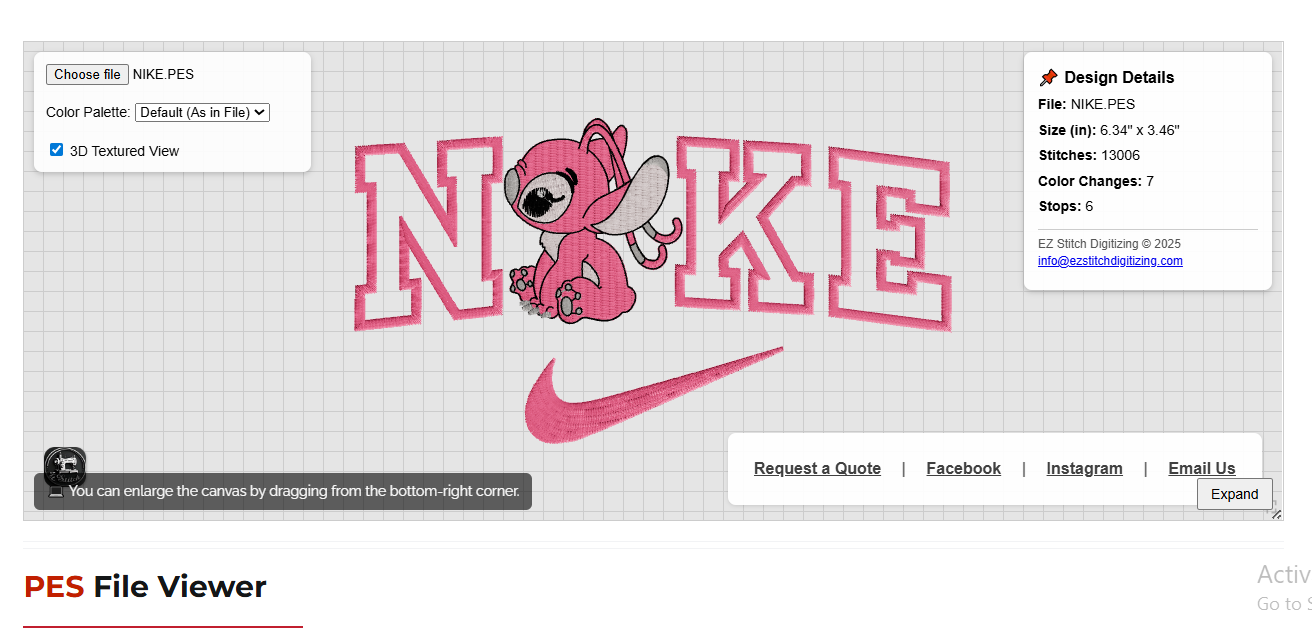
A free online PES viewer is a browser-based tool that allows you to open .PES embroidery files instantly.
These files are used by Brother embroidery machines and professional digitizers.
Instead of downloading heavy desktop software, you simply load your file and preview it online.
How Do I View PES Embroidery Files Online?
If you’re asking “how do I view PES embroidery files?”, here’s the simplest method:
Steps:
Open a browser (Chrome, Safari, Edge, or mobile).
Visit the EZ Stitch Free Online PES Viewer.
Load your
.PESfile.Inspect stitches, colors, and size in 3D.
👉 Tool Page:
https://ezstitchdigitizing.com/free-online-pes-file-viewer/
No signup.
No downloads.
No file uploads.
Why Not Use Desktop Software?
Many beginners search for a free program to open PES embroidery files, but desktop tools have limits.
Common Issues with Desktop Viewers
Require installation
Limited PES version support
No true stitch simulation
Slow on low-end systems
A free software to open PES files often lacks professional preview accuracy.
Online PES Viewer vs Desktop Software (Comparison Table)
| Feature | Online PES Viewer | Desktop Free Software |
|---|---|---|
| Installation | ❌ Not required | ✅ Required |
| Privacy | ✅ Client-side only | ❌ Depends |
| Stitch Simulation | ✅ 3D TrueView | ❌ Flat preview |
| Color Accuracy | ✅ Native PES colors | ⚠️ Limited |
| Mobile Support | ✅ Yes | ❌ No |
| Cost | ✅ Free | ⚠️ Often limited |
Key Features of EZ Stitch Free Online PES Viewer
1. Zero-Upload Privacy
Your file never leaves your device.
All processing happens inside your browser using JavaScript and WebGL.
This is critical for:
Commercial embroidery files
Client-owned designs
Confidential logos
2. True 3D Stitch Simulation
The viewer replicates professional digitizing previews.
You can clearly see:
Stitch direction
Layer stacking
Density buildup
Thread sheen (rayon vs polyester)
This helps detect issues before stitching.
3. Accurate Stitch & Color Data
The tool reads native PES metadata, including:
Stitch count
Color changes
Design width & height (in inches)
Stop count
Expert tip: Always confirm stitch count before production to avoid machine slowdowns and thread breaks.
4. Professional Thread Palette Preview
Switch between:
Madeira Polyneon
Wilcom palette
Randomized palette
This helps apparel brands visualize how designs look with different thread brands.
5. Mobile-Friendly Controls
Pinch-to-zoom, pan, rotate, and fullscreen mode work smoothly on phones and tablets.
Perfect for quick checks on the production floor.
Insider Tip from Professional Digitizers 🧵
Even if a PES file “looks fine,” problems can hide inside.
Before stitching, always check:
Excessive satin width (risk of snagging)
Overlapping tatami layers (thread breaks)
Poor underlay on stretchy fabrics
A viewer helps you see, but professional digitizing fixes the problem.
Why Professional Digitizing Is Still Your Secret Weapon
A PES viewer shows you the file.
It does not correct digitizing flaws.
If you notice:
High stitch count
Uneven fills
Poor stitch flow
You need expert digitizing.
👉 Request a quotation:
https://ezstitchdigitizing.com/embriodery-digitizing-quotation-form/
Who Should Use a Free Online PES Viewer?
This tool is ideal for:
Small embroidery businesses
Apparel brands
Print-on-demand sellers
Hobbyists testing designs
Production managers reviewing files
It saves time, money, and mistakes.
Frequently Asked Questions (FAQ)
1. What is the best free online PES viewer?
EZ Stitch’s Free Online PES Viewer offers client-side privacy, 3D stitch simulation, and native color accuracy without downloads.
2. Can I edit PES files with an online viewer?
No. A PES viewer is for preview and inspection only, not editing or digitizing.
3. Is it safe to upload embroidery designs online?
With EZ Stitch’s viewer, files are never uploaded. Processing happens locally in your browser.
4. Does this work for all PES versions?
Yes. The tool supports all PES versions used by Brother machines.
5. Why does my PES file look different on the machine?
This is usually caused by poor digitizing settings like density, underlay, or stitch direction—issues best corrected by professional digitizers.
About the Author
EZ Stitch Digitizing is a trusted embroidery digitizing partner with years of hands-on industry experience. We specialize in production-ready digitizing, stitch optimization, and file accuracy for commercial embroidery businesses worldwide.
Contact us:
Need your PES file optimized for clean stitching and lower thread breaks?
📧 Email: info@ezstitchdigitizing.com
📘 Facebook: https://www.facebook.com/EZStitchDigitizing1/