
Published by: EZ Stitch Editorial Team | Last Updated: May 2026
| Feature | SE400 | SE700 |
|---|---|---|
| Built-in Designs | 67 | 400+ |
| Hoop Area | 4″ × 4″ | 4″ × 4″ |
| Wi-Fi Transfer | No | Yes |
| USB Port | Yes | Yes |
| Display | 1.4″ LCD (buttons) | 3.7″ Touchscreen |
| Native Format | .PES | .PES |
| Max Stitch Speed | 400 SPM | 400 SPM |
| Built-in Fonts | 5 Fonts | 11 Fonts |
| Sewing Function | Yes | Yes |
| Auto Needle Threader | Yes | Yes |
| Price Range | ~$180–$230 | ~$499 |
| Specification | Detail |
|---|---|
| Machine Type | Computerized Embroidery + Sewing |
| Hoop / Field Size | 4″ × 4″ (100 × 100 mm) |
| Built-in Designs | 67 embroidery designs |
| Built-in Stitches | 70 sewing stitches |
| Built-in Fonts | 5 embroidery fonts |
| Max Stitch Speed | 400 stitches per minute |
| Display | 1.4″ LCD with backlight |
| Native File Format | .PES |
| Additional Formats | .DST, .EXP, .JEF, .HUS, .VIP, .VPS, .PCS, .XXX |
| Wi-Fi Connectivity | No |
| USB Port | Yes — USB Flash Drive |
| Auto Needle Threader | Yes |
| Thread Colours | 1 needle / manual colour change |
| Bobbin System | Drop-in, Top-load |
| Presser Feet Included | 5 presser feet |
| Buttonhole Styles | 1-step auto buttonhole |
| Machine Weight | 10.8 lbs (4.9 kg) |
| Dimensions (W×H×D) | 16.4″ × 11.4″ × 8.3″ |
| Warranty | 25-year limited |
| Best For | Beginners, Home Users, Budget Buyers |
‘
The Brother SE400 is a legendary “hybrid” workhorse that remains a gold standard for crafters and small business owners. While newer models like the Brother SE625 Computerized Sewing and Embroidery Machine have entered the market, the SE400’s mechanical reliability makes it a top choice for those seeking professional results on a hobbyist budget.
Whether you’re looking to buy a used unit or mastering your current machine, this guide covers everything from technical specs to custom digitizing workflows.
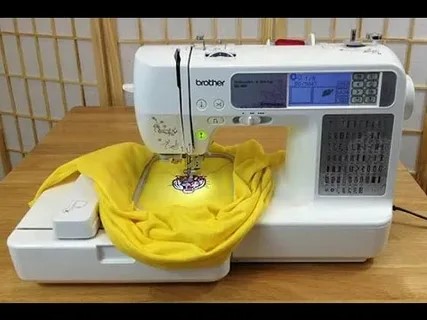
1. Technical Specifications at a Glance
To rank as the best resource on the internet, we must look at the raw data. The SE400 is celebrated for its computerized precision and 710 stitches-per-minute efficiency.
Technical Specifications
| Feature | Specification |
|---|---|
| Embroidery Area | 4″ × 4″Standard Hoop |
| Total Stitches | 67 Sewing70 Embroidery |
| Max Speed | 710 SPMStitches Per Minute |
| Connectivity | USBDirect USB-to-PC Connectivity |
| Threading | Advanced Automatic Needle Threader |
| Bobbin | SA156Quick-Set Drop-in · Class 15 |
2. Unlocking Custom Potential: The PES File Workflow
The SE400 “speaks” in PES data. To move beyond the built-in library, you must understand how to manage and create these files.
The “Machine Brain” Checklist:
What are they? Read our deep dive into What are PES files? to understand why your machine needs specific stitch data.
How to view them? Never stitch blindly. Use our Free Online PES File Viewer to analyze density and color stops before hitting “Start.”
How to manage them? Check the latest PES Software knowledge base to organize your design library.
3. From Image to Stitch: The Digitizing Funnel
The most common search query for this machine is “Brother SE400 custom embroidery.” You cannot simply “save an image” as a stitch file. You need professional conversion.
The Conversion Roadmap:
Depending on your source file, the process varies. We have built specific guides to help you navigate this:
Vector Graphics: The Complete Guide to Convert SVG to PES.
Standard Photos: How to Convert JPG to PES Embroidery Files.
Web Graphics: How to Convert PNG to PES: A Step-by-Step Guide.
Pro Tip: If you want a 100% guarantee that your design won’t birdnest or break needles, how to make a PES file properly involves manual pathing. At EZ Stitch Digitizing, we specialize in manual digitizing for Brother machines.
4. Advanced “Wiki” Insights: The Secret Features
To truly be a “Wikipedia” for the SE400, we must address the “hidden” capabilities:
Brother SE400 Hat Embroidery
Many claim you can’t do hats on a 4×4 flatbed. They are wrong. While you can’t use a professional cylinder frame, you can embroider hats by “floating” them on a heavy-duty stabilizer or using a specialized 4×4 hat hoop.
Modern OS Compatibility (Windows 11 & Mac)
Since the SE400 uses a legacy USB-B connection, some users struggle with driver recognition.
Resource: Visit the Official Brother SE400 Support Page to download the latest USB connection manuals.
5. Maintenance & Troubleshooting
Even a workhorse needs a tune-up. If you run into issues, the community is your best friend.
Tension Issues: If your bobbin thread is peeking through, check your tension settings or replace the bobbin case.
Community Support: For deep troubleshooting, check this active Brother SE400 Discussion on Reddit where pros share real-world fixes.
Mastering the PES Format: A Guide for SE700 Owners
The Brother SE700 thrives on the .PES format. To get the most out of your machine, you need to understand how these files work and how to create them.
Your Digital Toolkit:
Understanding Formats: What are PES files? Learn why this format is the lifeblood of Brother machines.
The Software Edge: Explore the Best PES Software to manage your library.
Creation & Conversion:
Want to turn a logo into a stitch file? Learn how to make a PES file.
Convert your artwork instantly: PNG to PES | JPG to PES | SVG to PES.
6. Frequently Asked Questions (FAQ)
Final Verdict: Is it still worth it?
The Brother SE400 remains one of the most cost-effective ways to enter the world of custom apparel. When paired with high-quality digitizing, it produces results that rival commercial machines.
Looking for the next step?
About the Author: EZ Stitch Digitizing is a professional embroidery studio specializing in commercial-grade file conversion. We ensure every stitch is optimized for Brother, Baby Lock, and Janome machines.